FAST-BGP NETWORK LAB
IP quality checks: proxy flags, risk and residential claims
Read IPquery VPN, proxy, Tor and risk signals without confusing them with residential proof or abuse reports. Use source, time and missing evidence to troubleshoot Claude and ChatGPT access.
When preparing a network for Claude, ChatGPT or other AI tools, people often ask whether an IP is clean. Start with the source's proxy flags and risk information, then identify where access fails. That is more useful than a single purity score.
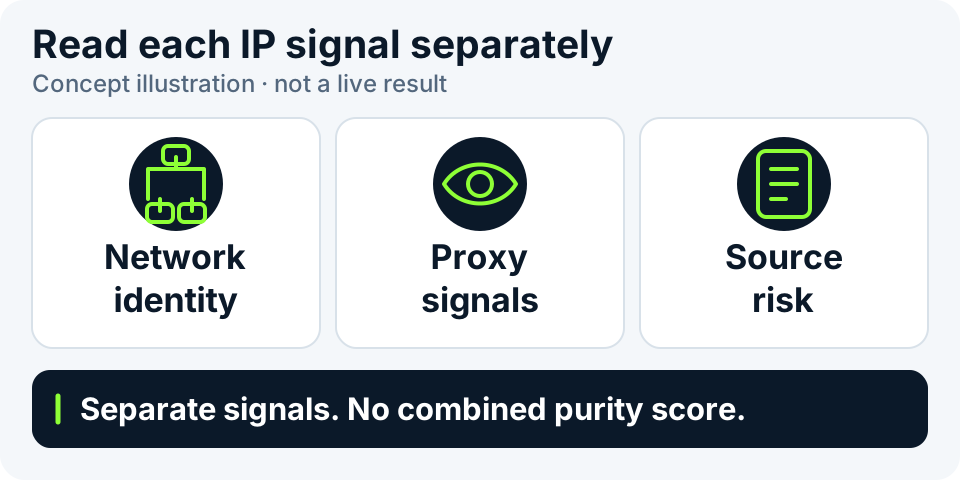
This guide separates the signals often grouped under IP quality or purity. Network type, proxy detection and historical records answer different questions. A single score cannot replace them or determine account and model availability.
Read four different kinds of evidence
Understand each field before comparing results. A provider's classification is that provider's assessment, not proof of what was delivered. A clear result in one category does not validate the others.
| Evidence | What it can help establish | What it cannot establish alone |
|---|---|---|
| Country, ASN and network organization | Attribution and network ownership in a provider's records. | Physical facility, home broadband use or dedicated allocation. |
| Residential, hosting or mobile classification | A source's classification of address use. | That this connection comes from a home device, or that the label will never change. |
| Proxy, VPN or Tor labels | Whether that source identified the corresponding signals. | That a missing label excludes proxies or guarantees platform acceptance. |
| Reports, lists and historical records | Events recorded by a source within the query's scope. | That missing records prove no past abuse or no future account restrictions. |
What can be checked, and what still needs evidence
Use “Check current environment” to identify this visit's exit, or “Look up a specific IP” for an existing public address. IPinfo Lite provides country, ASN, network organization and organization domain. Basic attribution does not include residential certification or abuse records.
When the page offers “Check IP quality”, click it to query the source named in that panel. For IPquery, the returned fields can include datacenter, mobile, VPN, proxy and Tor flags plus a risk indicator. Missing or malformed fields and failed queries remain unknown. No button or “Not assessed” does not mean a check has already run.
These free sources cannot establish residential, native or dedicated status and do not supply full abuse-report records. The free public version does not enable AbuseIPDB report queries; “Abuse data not connected” is not zero reports. HTTP dual-stack exit and STUN candidate checks must also be started separately; they do not replace IP-quality data.
What IPquery flags and its risk indicator mean
These fields express IPquery's assessment. They are not a trust score calculated by this site or an official Claude or ChatGPT risk decision. Check the target and query time first; the time a result was retrieved is not the underlying database's update time.
| Source field | How to read it | What does not follow |
|---|---|---|
| is_vpn / is_proxy / is_tor | true means the source applied that flag; false means the source did not flag a known type. | false does not rule out every proxy or establish account access. |
| is_datacenter / is_mobile | Separate datacenter and mobile-network flags, not a single overriding type certificate. | Not datacenter or not mobile cannot be rewritten as residential. |
| risk_score: 0–100 | IPquery's risk indicator, where a higher value means greater source-assessed risk. | 0 is not zero risk, zero abuse reports or a perfect purity score. |
| Unknown / unavailable / expired | This evidence is missing, incomplete or no longer fresh; other valid results can remain. | Never fill a missing value with false, zero or safe. |
A practical reading order
Keep the target fixed. After changing devices or exits, record a new time rather than combining observations for different addresses or dates into one conclusion.
- For this visit's exit, select “Check current environment” and click “Start check”. For an existing address, choose “Look up a specific IP”, enter the public IP and click “Look up IP”.
- Confirm the target, IP version, source and observation time. This website's exit is not proof that every application uses the same address.
- If “Check IP quality” is offered, start it separately and read IPquery flags and its risk indicator. Leave missing type, proxy and reputation data unverified; do not infer residential status from an operator's name.
- Keep conflicting sources side by side with their dates and scope. Repeat a check to investigate a change, not to search for a preferred result.
- Use a redacted report when sharing. Verify actual application use separately while meeting the platform's location and account requirements.
An empty result can mean several things
These are interpretation examples, not results for a real IP or a demonstration of connected reputation sources.
| Example state | Reasonable interpretation | Next action |
|---|---|---|
| IPquery risk indicator is 0; abuse data is not connected | Only a source risk value was obtained, not a report count. | Keep the findings separate; do not display no abuse reports. |
| Source A: not configured or not queried | No evidence was obtained. | Keep it unverified instead of showing a green pass. |
| Source A: timeout or rate limit | This request did not complete. | Retain other successful results and retry the failed item later. |
| VPN flag is false; residential status is unknown | The source did not flag a known VPN, but residential evidence is still missing. | Do not combine the states into a home-residential label. |
| Attribution succeeded; network type is unknown | Complete attribution does not mean classification is complete. | Show separate states without discarding successful fields or inventing a label. |
Why different sites may disagree
Services can differ in coverage, update schedules and classification methods. Check that they looked up the same address, whether a cached result is involved, and whether each field concerns network type, proxy detection or abuse history. Those are not interchangeable metrics.
Keeping the source, field, time and query scope is usually more useful than saving only a red or green score. If resource information conflicts with a database label, ask the supplier for delivery evidence or use the data service's correction process.
How this helps with AI-tool troubleshooting
These observations help identify the target, flag records for review and separate network information from application behavior. Opening a website does not verify API permissions, account status or a successful model call.
A residential label, no abuse records or low latency cannot guarantee Claude or ChatGPT access. First record whether the error occurred in the website, API or Code, then keep its time and redacted details. A single label does not establish the IP as the only cause.
Share evidence, not credentials
Useful shareable details include time, source, execution state and a masked address. “Show full IP in this panel” controls only the IP-quality panel and its copied text; it does not mask the original query input or other results. Review the whole page before taking a screenshot. Do not publish proxy passwords, cookies, API keys or complete account screenshots.
An IP-quality query sends the queried address to that data source. Public HTTP and STUN observers also see the exit used for their connection. Local language and time zone need not be uploaded with IP data. For country, ASN and organization-domain definitions, start with the basic IP lookup guide.