
In decimal units, 100 Mbps is 12.5 MB per second. That is a unit conversion, not a download-speed guarantee. Actual downloads also depend on the server, network path, your local connection, transfer method and other traffic.
| Bandwidth | Decimal MB/s |
|---|---|
| 10 Mbps | 1.25 MB/s |
| 100 Mbps | 12.5 MB/s |
| 1,000 Mbps | 125 MB/s |
Unit conversions only—not product commitments or measured speeds.
Mbps and MB/s: check the capital letter
Mbps usually means megabits per second; MB/s means megabytes per second. Lowercase b denotes bits and uppercase B denotes bytes. There are eight bits in a byte, so divide Mbps by eight to obtain decimal MB/s.[1]
What if the application shows MiB/s?
One MB is 1,000,000 bytes; one MiB is 1,048,576 bytes. A rate of 100 Mbps is about 11.92 MiB/s—the same rate as 12.5 MB/s. Read the application’s actual unit label before comparing numbers. MB/s and MiB/s are not interchangeable.[1]
Why a download can fall short of the converted rate
A download rate describes data reaching your device. Check the stages below; more than one can limit a transfer at the same time.
From the file source to your device
AI concept illustration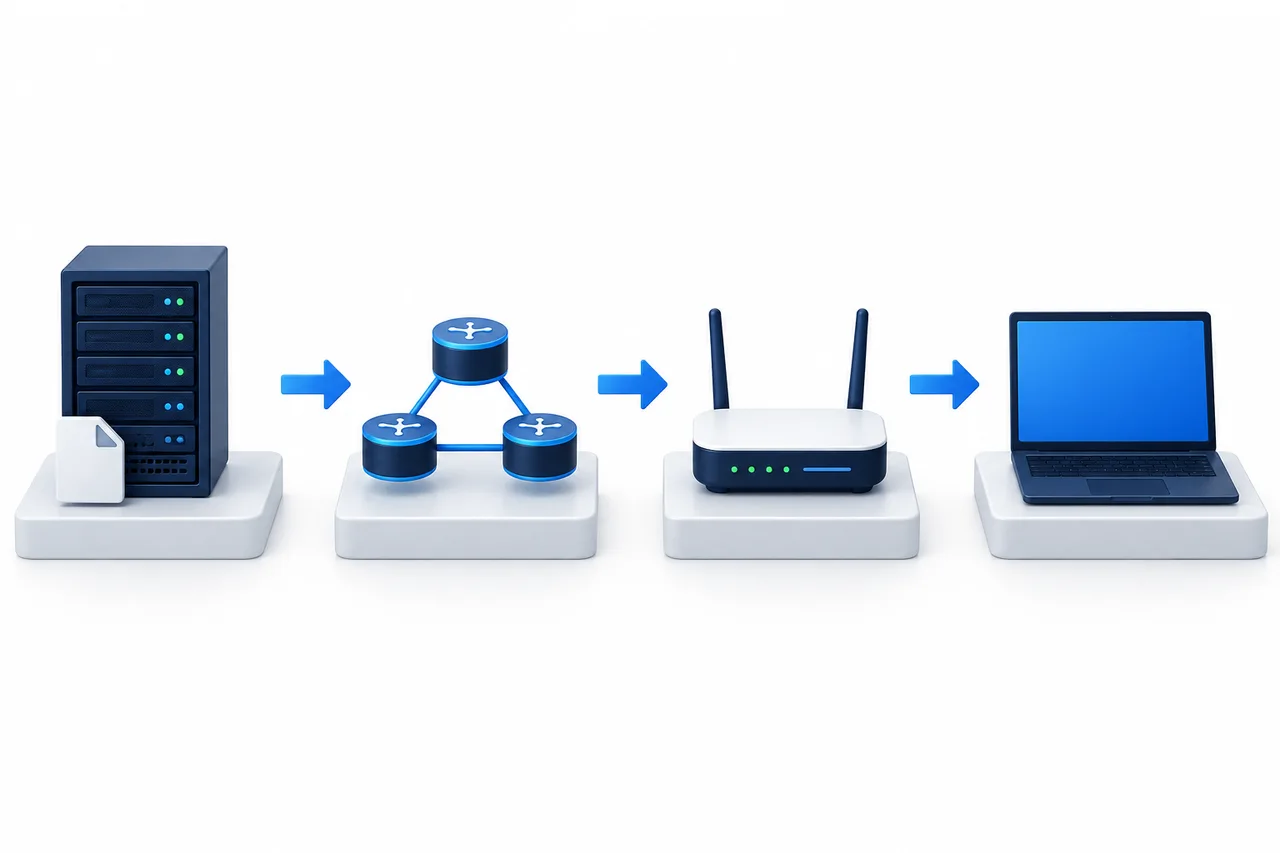
- Left · Source and network path
- Source limits, server egress, congestion and transfer methods can affect the rate.
- Right · Local router and user device
- Check broadband, Wi-Fi, device processing and disk writes. Other tasks may share bandwidth.
Application download schematic, not an actual route or product measurement. Arrows do not indicate hop counts, speeds or fault locations.
- 1File source / server
- 2Network path
- 3Local router
- 4User device
- Source and server egress
- The source may limit each connection or account. Server egress, plan limits and sharing conditions can also constrain throughput: the rate at which data is actually transferred.
- Path and transfer method
- Congestion, retransmissions, protocol overhead and the transfer method affect useful data delivery. A nominal line rate does not all become file content.
- Your connection and device
- Local broadband, Wi-Fi, device processing or disk writes can be limiting factors. A network test that does not write to disk is not equivalent to a file download.[2]
- Other traffic
- Downloads, users and applications may share the available bandwidth. Record what else was running rather than saving only a speed reading.
These are possible constraints to investigate. A slow download alone does not identify a fault at the source, on the path or on your device.
Does one slow download mean insufficient bandwidth?
One task measures a particular destination, connection method and time period. A multi-connection test transfers several streams at once and may report a higher aggregate rate. Record the connection mode and count when comparing results.[2]
A higher multi-connection total does not promise the same speed for one application connection. Do not treat a single-connection file download and a multi-connection benchmark as equivalent measurements.
A low ping does not establish a high download rate. Ping measures round-trip responses; downloads involve sustained data transfer. One test also cannot establish all-day performance.
How to compare online and local ping results →Keep the destination and file source, time and time zone, source network, IPv4 or IPv6, connection mode and count, displayed units and other active tasks. With permission, make a few bounded checks at relevant times and save the conditions with the results. Do not repeatedly generate traffic in pursuit of a maximum reading.
Rate and data allowance answer different questions
How much per second
Mbps
A transfer rate, such as 100 Mbps.
How much over a billing period
GB / TB
A data quantity, such as a 1 TB monthly transfer allowance.
At a constant decimal rate of 10 MB/s for 60 seconds, about 600 MB would be transferred.
10 MB/s× 60 s≈ 600 MB
Simplified arithmetic, not a statement of how a bill will meter usage.
Check whether inbound and outbound traffic are counted separately, the billing period and what happens after the allowance: throttling, additional charges or another policy. Products can have different rules.
A product number may describe port speed, a peak rate or explicitly guaranteed bandwidth. Read the definitions of shared, dedicated and burst capacity. A port supporting a rate does not promise that every task can sustain it.
For usage-based cloud charges, read the total-cost guide →What to check when results differ
Illustrative scenarios only, not customer cases or product test reports.
Observation · 1
A 100 Mbps plan shows about 10 MB/s while downloading.
Next check
Align the units, then check the target, connection method, competing traffic and time. This number alone neither proves a route fault nor certifies the product.
Observation · 2
A public speed test looks good, but a file download is slow.
Next check
Check whether the target, connection method and time match. Investigate any limit at the file source.
Observation · 3
One user is fine; several simultaneous users slow down.
Next check
Record concurrency and check aggregate bandwidth use, application processing and server resources—not just a one-user test.
Questions to ask before ordering
- Does the advertised number mean port speed, peak capacity or explicitly guaranteed bandwidth?
- Are there sharing, burst or other restrictions?
- Is there a monthly data allowance, and how is it metered?
- What happens when that allowance is exceeded?
- Is an authorized test file or endpoint available for the selected product?
- How might the test node differ from the delivered instance?
Fast-BGP’s network tools do not currently include a download-speed test. Ask the supplier for an authorized file or endpoint for the intended product, and follow its traffic, frequency and time restrictions.