
Reverse DNS looks up a PTR hostname for an IP address. A returned name does not identify every website on that server, and a missing record does not establish a problem with the IP. Check whether the lookup completed with a usable response before reading the PTR answers.
Two directions, separately configured
A forward lookup uses A records for IPv4 addresses and AAAA records for IPv6 addresses. A reverse lookup uses PTR records to look up names from an IP. These records are configured separately; they do not automatically stay in agreement.[1][2]
Separate lookups in two directions
AI concept illustration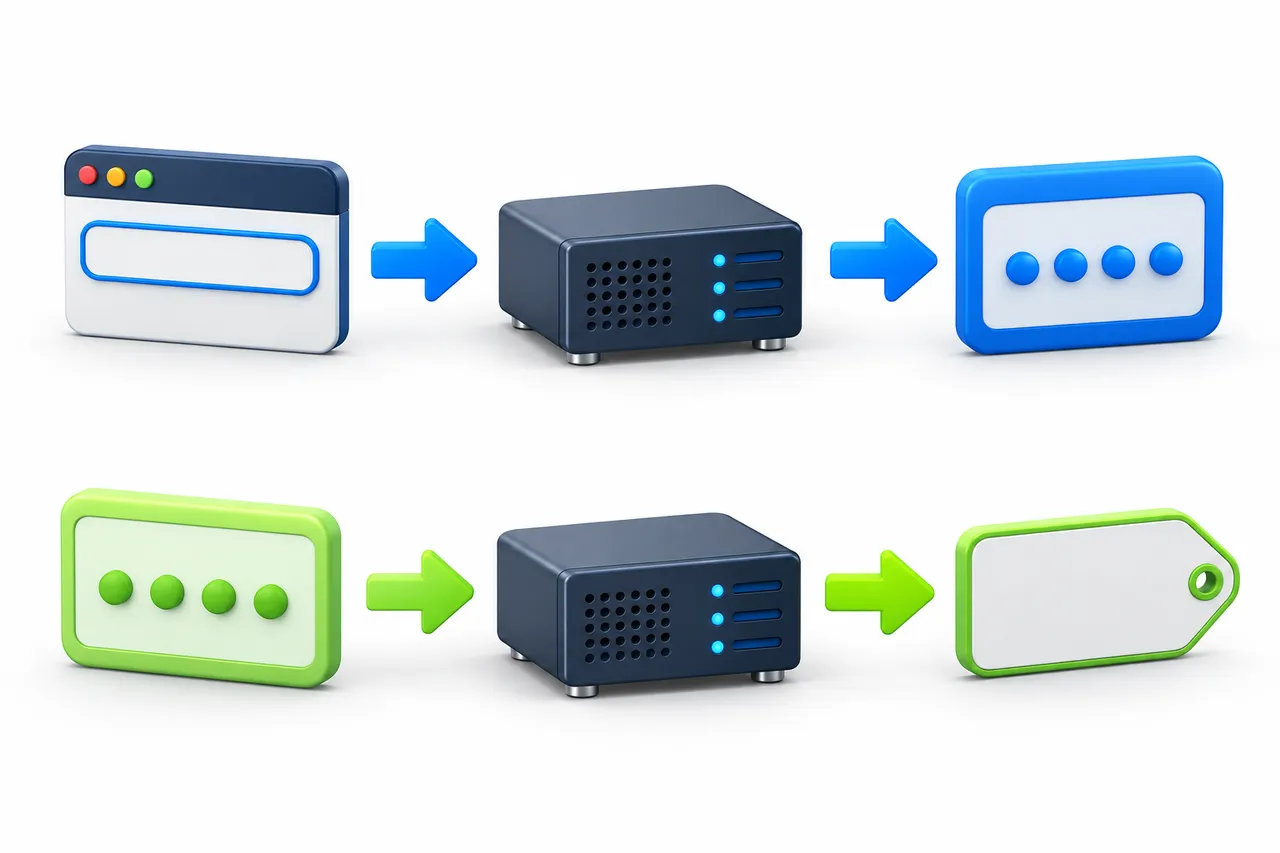
- Top · Forward lookup
- Domain → A / AAAA query → IP address
- Bottom · Reverse lookup
- IP address → PTR query → hostname
Lookup directions only. Forward and reverse records need not agree. Concept devices, not actual infrastructure or lookup results.
Forward lookup
- Domain name
- A / AAAA query
- IP address
Reverse lookup
- IP address
- PTR query
- Hostname
Lookup directions only. Forward and reverse records need not agree. One IP can host several websites; PTR is not an inventory of those sites.
What does a returned hostname tell you?
A PTR name is configured by whoever manages the reverse DNS zone. It may reflect a carrier’s or administrator’s naming convention. A city, broadband, cloud or company name is a clue to investigate—not proof of physical location, residential use, safety, reputation or acceptance by a particular platform.
Country, ASN and organization fields come from an IP attribution dataset. PTR comes from DNS configuration. They answer different questions, and an organization’s domain is not the same thing as a reverse DNS hostname.
Understanding country, ASN and organization fields →No PTR shown: check the outcome first
What the current tool actually shows
Open Network Lab and select “Reverse DNS”. Enter a public IPv4 or IPv6 address, not a domain or URL. Choose Asia, North America or Europe; Globalping assigns up to three public probes in that region. This interface does not select a city, carrier or fixed probe. Lookups run at remote probes, not on your device or necessarily on any Fast-BGP product network.[3]
Each probe shows its city, country, network and completion state, followed by a DNS response code and query duration. Answers list record type, value and TTL; there may be several. Check the type before treating a value as a PTR hostname. The ms value is DNS query time, not ping latency. TTL is in seconds. A missing field appears as “—”, not zero.
Open Network Lab and select “Reverse DNS” →Read the state before the answer
These cards explain existing interface states. They are not captured lookup results.
Finished · PTR returned
The probe is marked “Finished” and a PTR answer contains a name. Keep that name as a DNS record, not evidence of hosted websites, physical location or IP reputation.
Finished · no PTR returned
Check the DNS response code. “Finished” means the probe job ended; it does not establish a successful DNS answer. A usable answer without PTR does not make the IP invalid or disconnected. Treat SERVFAIL and similar errors as lookup failures.
Testing / Incomplete
No complete answer is available yet, or the lookup failed. A timeout or “The service is temporarily unavailable. Please retry later.” also cannot establish that PTR is absent. Retry once later and retain the state and response code.
An empty answer list currently displays “No reverse record returned; this does not imply the target is unavailable.” That message can also appear while a result is unfinished or failed. Do not use it alone to decide whether PTR exists; wait for completion and read the DNS response code.
More detail: NOERROR, NXDOMAIN and failures
NOERROR reports no DNS error, but does not promise a PTR answer. NODATA means the name exists without data of the requested type. It is inferred from the full response, not a separate response code. This tool does not display the entire DNS message, so an empty list alone cannot establish NODATA.[4]
NXDOMAIN says the queried DNS name does not exist. For reverse DNS this concerns the reverse name, or potentially the final name in an alias chain. That differs from an existing name without PTR data, and does not mean the IP address itself does not exist.[4]
SERVFAIL reports a resolution failure; a timeout means no answer arrived within the wait period. Neither confirms that a record is absent.[1]
PTR, IP attribution and website names
| Information | Question it answers |
|---|---|
| Country, ASN, organization | What attribution the selected IP dataset records—not a classification of use. |
| PTR | Which name is configured in reverse DNS. |
| A / AAAA | Which IPv4 or IPv6 addresses a domain’s forward lookup returns. |
| Website access | Also depends on the domain, HTTP or HTTPS, and application configuration. |
A PTR hostname need not open as a website. Visiting an IP directly does not list every website hosted at that address.
Does a missing PTR affect normal use?
Ordinary web access mainly depends on the website’s forward DNS and application configuration. A missing PTR does not establish an outage. Check whether the actual domain resolves and the website connects.
Some receiving mail systems check the sending IP’s reverse DNS and forward consistency. Gmail, for example, requires a PTR for the sending server’s public IP and an A or AAAA record for that hostname pointing back to the same sending IP.[5]
PTR does not guarantee delivery. Authentication, reputation and recipient policy still matter. Check the mail service’s actual requirements rather than applying one provider’s rules to every receiving system.
Who can change a PTR record?
Reverse DNS is normally managed by the address-space holder or an authorized delegate. Ask your server or IP provider about changes. Adding a record to your own domain’s ordinary DNS zone does not give you control of the IP’s reverse zone.[6]
- 01
Confirm support
Ask whether this resource supports PTR changes and whether forward DNS or other prerequisites apply.
- 02
Prepare the hostname
Supply the full hostname as requested. Check its spelling and any required matching forward records.
- 03
Submit as instructed
Confirm whether to use a control panel or ticket, and which IP and name to supply. Do not publish account credentials.
- 04
Verify the result
Confirm the change status with the provider. Save the lookup time, probe details, response code and returned records.
Generic workflow, not a screenshot of our interface. It does not promise self-service PTR changes for every Fast-BGP product.
More detail: TTL is not a global update countdown
TTL describes how long a DNS record can be cached, shown here in seconds. A cached answer may show remaining lifetime. Resolvers can have different cache states, and subsequent answers depend on successful refreshes as well. Expiry does not mean every location updates simultaneously.[1]
Confirm the supported settings before submitting a change. Afterwards, query the same IP and compare the returned hostname with the requested name and any required forward records.
Open Network Lab and select “Reverse DNS” →